Thursday, 24 December 2015

10 WordPress Tools Guaranteed To Boost Your Results and Productivity


I was inspired to create this post when I found that there are some pretty weak top 10 lists about WordPress on the web. I spent so much time searching for the ideal list that I felt a strong desire to compile one myself.

 1. How To Mobilize Your WordPress Site

You’re probably missing out on quite a few readers, and you’ll miss out on more if you don’t go mobile with your blog. In January 2012, nearly 9% of all global pageviews were from a mobile device. This number is expected to keep growing, to the point where in 2015 the pageviews from mobile devices will outgrow the pageviews from laptops and personal computers. Upgrade your site to have a mobile version!
The easiest way to do this is through the free plugin WP Touch. Once installed, you edit some settings, create a few icons or use stock icons, reformat some pages if necessary, and you have a beautiful mobile site that looks and functions like an app! Now if someone opens your blog (let’s say from an email, or from a Facebook link) on their phone, they’ll actually be able to consume your content easily, as well as comment on it and share it, rather than zooming in and out in frustration trying to navigate your site.
If you want to take things to the next level, upgrade to the premium version WP Touch Pro, which has some additional options to customize even further.
A lot of newer themes are also mobile friendly (responsive), meaning they already have a mobile version built in, so you don’t have to worry about it. So if you’re thinking about changing themes, keep this in mind while doing your research.
Here is how a post on my personal site looks in mobile when the mobile version is active:
 
Here is how it looks when the mobile version is not active:
 
Which is easier for someone to read? Which will they stay on longer and engage with longer?

Upgrade your site to mobile and be better prepared for the future.

2. Speed up! Some Plugins to make editing your posts more efficient

Viper Video QuickTags

If you have ever embedded a video, you know that you need to use HTML code to make it happen. Make your life easier and save time by utilizing the Viper’s Video Quicktags plugin.
After installing the plugin and adjusting a few settings, you will have the ability to copy and paste the video link and embed videos with the click of a button. The plugin is super simple to use and gives you the option to embed more than one video at once!
Check out the activation details below:
1. Viper’s Video Quicktags will show up on your Dashboard Menu under “settings”
2. Uncheck everything under “Show Editor Button” except for YouTube
4. This will create a button when you add a page/post
5. Click on the new button above the WYSIWG visual page editor
6. Paste the direct URL to your video and edit the size by opening the accordion below
7. Click okay and this will populate a shortcode into the post box
8. Click on update and check out your super slick videos once you refresh the page!
Mission accomplished in a quarter of the time and you didn’t even have time to think about it before the video was embedded and sized.

Faster Image Insert

Embedding images into a page requires a couple of steps. You need to click on the media button and this opens a light box. Once you upload the image, you can edit the size and insert into the page or post.
The process is slow because a lightbox has to load in between every image that is added. It’s easy to imagine why waiting for a lightbox to open in between inserting each image can get pretty annoying, and not to mention time-consuming. This is where Faster Image Insert comes in.
Faster Image Insert allows you to upload images much faster because it adds a meta box (no more lightbox) right below the WYSIWYG visual editor. You can insert multiple galleries or images at once, including NextGen Galleries, which is pretty awesome. You can also change title/captions on a mass scale with a single click.
It appears right below your post, whether in visual or HTML:

3. Plugins to boost your SEO

All In One SEO Pack

This plugin is a must have for anyone interested in getting search engine traffic. It is great for both the beginner and the advanced user. The plugin is intuitive and includes features like automatic optimization of your titles for search engines and meta tags. This is a plug and play plugin, which means that it is effective as soon as it is activated.
Advanced users are able to fine tune just about any setting, such as the ability to override any title and set any meta description and meta keywords you want. This is going to increase your SEO presence drastically, which will definitely help you increase your sites traffic.

Google XML Sitemaps

In order for your site’s pages and posts to be found in Google’s search engines, they need to be indexed/stored in Google’s massive database of websites and other web content.
There are many ways to get indexed faster by Google such as Tweeting your new page or post but using this plugin makes the process simpler.
Each time you create a new post or page, the plugin will update your site’s XML sitemap (which the search engines use to index your site) and automatically let the search engines know about the update. The benefit here is obvious. Get the plugin asap and start sending your message to a larger audience.

SEO Pressor

SEO Pressor takes the SEO within your blog posts to a new level. It allows you to write for a specific keyword, and measures your post white you write for how effectively you are writing for that keyword. It even gives you an overall score along the way. Here’s a screenshot of what it does:

4. How To Uncrash Your Site! (for plugin issues)

Steps to Uncrashing Your Site

This is one of the easiest problems to fix, yet I still notice a ton of forums being bombarded with questions like “I Installed a plugin and my site crashed!! I need a developer ASAP!”
Take a deep breath, regain your composure and listen to me. Even though the issue may appear to be fatal, it is actually one of the simplest issues to fix.
Here are the 5 easy steps to uncrash your site:
1. Login to your FTP Client
2. Find the Plugin Folder in your Directory
3. Sort Plugins by “Last Modified”
4. Select the Plugin in Question
5. Delete the Plugin
Once Plugin is deleted, it will no longer show up or crash your site. You can thank me after you calm down!

5. Plugins to Make Affiliate Marketing Easier

Pretty Link

Say you have an affiliate link: www.domain.com/longconfusingmess
Let’s also say you have a domain called: www.incomediary.com
Wouldn’t it be awesome if you could customize the link and still get credit for the referral? Wouldn’t it also be valuable if you could track both the total number of clicks as well as the total number of unique clicks to monitor performance – regardless of if the link is in your email, WordPress site, or anywhere else?
Pretty Link allows you to do both. The process is super simple and it creates a ton of value. Here is an example:
Before Pretty Link: www.hostgator.com/longconfusinglink
After Pretty Link: IncomeDiary.com/hostgator
In addition, it tracks both total and unique clicks and displays the respective numbers in the plugins options. Pretty damn awesome.
It also makes it easy for you to remember all your affiliate links in case you ever need them on the fly while chatting with someone. This alone has easily hundreds of extra dollars in my pocket .

Amazon Associate Filter Plugin

Amazon is one of the largest and most well known internet companies in the world. It would only make sense that the Amazon Associate Program is one of the best affiliate programs, aS they offer a massive number of product categories, which is great for Niche sites that are unable to find relatable affiliate programs.
Amazon makes it very simple to integrate the program with your current site. If you don’t have an account, I highly suggest that you head over to the site and sign up.
The Amazon Associate Filter is a great time saving plugin for Amazon affiliates. It automatically will change any links to the amazon website to your affiliate link without revealing it to the reader. Say goodbye to being slowed down by finding and pasting your affiliate link into your page or post. Amazon Associate Filter is a must have plugin for any Amazon Affiliates!

6. Contact Forms – you have options!

When you first logged into WordPress you may or may not have notice that there is no page or theme option to add a contact form to your site. Contact forms allow visitors to contact you with questions, complaints, suggestions, etc.
Here’s some good news: You have options! I introduce you to three here, but use Google to find more information. You may even discover a brand new plugin that makes Gravity Forms look like childs play. Don’t spend too much time, but definitely check out a link or two.

Contact Form 7 (Flexible)

If you value simplicity and flexibility, Contact Form 7 is a great option. It allows you to design the form, email, and even lets you manage multiple contact forms. In addition, it supports many features including AJAX submitting, CAPTCHA, Akismet spam filtering, file uploading, and more.

Contact Me

In addition to providing you with a neat and flexible contact form, this plugin allows you to have a floating contact me/us floating button on the side of your site on every page, like this:
It’s a nice call to action, especially if you provide any services or are looking for leads to get in touch with you. While the plugin itself is free, to remove the Contact Me branding and get more options, you do have to upgrade to the premium version.

Gravity Forms (Premium)

If you prefer a premium contact form that includes an intuitive user interface and the works in terms of options, then Gravity Forms is the best option for you. While the plugin costs a little bit of money, the time it saves you and the improvement in quality is well worth it, especially if you are building multiple forms.

7. Make Your Site Neater and brand more visible!

Favicon! – plugin and creation tool

A Favicon is the little image that shows up on your browser’s tabs when browsing your site and can really help brand your site. It may be a small image, but has potential to be a significant part of your branding effectiveness.
An awesome site for Favicons is: www.favicon.cc. You can even draw a custom Favicon but I don’t recommend this because it has proven to be less effective – unless you’re great with design. You can also upload an image and turn it into a Favicon, or find tons of free favicons that might match your brand.

Plugin: All in One Favicon

All in One Favicon uses the favicon you created and displays it on the browser tab for the public. You can create both front end (what the viewer see’s) and back end (what you see in your dashboard). If you don’t have a favicon, you are missing out on an opportunity to brand your site.

Logo – cooltext.com

While creating a custom logo in Photoshop or Illustrator is great – a lot of new bloggers don’t have the skills, time, or money to do so. You can actually create a unique text based logo in minute using this cool tool. It’s a lot better than having a plain text header on the top of your site!
Enter: CoolText.com to save the day (or at least a few minutes). They offer a ton of customization options which makes the experience much more personal.
You can choose from a boatload of fonts, effects, colors, sizes and file types. I promise that you can create very professional logos as long as you make sure to explore ALL of the options first. The best part is – it’s all free!

8. Speed up your Site!

Get A Caching plugin

I’m sure you have been on a blog or even corporate site that feels as if it is taking forever to load. Why would you want someone to have the same, annoying experience? A slow site can have devastating effects on site traffic, but thankfully there is a plugin to make it easy to speed your site up.
There is a solid selection of Caching Plugins on the web. The most popular ones are W3 TOTAL CACHE and WP SUPER CACHE, but don’t let this stop you from researching and trying out other programs.
A caching plugin is valuable because it saves your page the first time that a visitor visits it.It then will used this saved information to automatically load the page based on the information. It will also automatically re-cache your site if any content changes!
One less thing to worry about.
Some tips: One of the simplest ways to speed up a slow site is to be sure to deactivate all of the plugins that you are not currently using on your site. We recommend a lot of plugins here and I know this may appear to contradictory, but it’s important not to go overboard! Deactivate unimportant plugins, especially those that work on the outside of your site vs. the admin panel, and you will see the difference in speed.
Decrease Image Sizes before Uploading – Some people just upload images and then resize them using the WordPress (HTML) image editor. Try to avoid this when you can. Go into Photoshop, Save For Web and Devices, and resize the images to your desired dimensions. That way you get smaller file sizes, which load faster, and speed up your site, sometimes very significantly.

9. Get Social!

You work hard putting great content on your blog. Make sure it’s easy for people to share and discuss so you get more traffic, credibility, and user engagement.
Sharing
I recommend using the Digg Digg plugin. It’s the quickest, simplest, and neatest way to get all your social media sharing buttons on your posts.
If you want to look cool, use the floating option (like you see to your left). There are a ton of sharing options, and which ones you use depends on the nature of your content.
I recommend including at least: Facebook Like, Facebook Share, Twitter, Google+, Pinterest, and LinkedIn. The rest is up to you.
Comments
I STRONGLY recommend Facebook comments. They will get you more comments (people are so familiar with Facebook comments already, it’s more natural for them to Like and
Comment via Facebook than through the WordPress commenting system), they will reduce your spam comments, and they will ultimately get you a lot more social links back to your site, so more traffic! Make sure you make the settings such that it automatically posts the comment on Facebook unless the commenter disables it.
The other social commenting option is Disqus. It’s also a free plugin which allows people to comment through social profiles, but since people are usually logged into Facebook when surfing the web,
Facebook comments will likely get you more traction than Disqus.

10. Get Personal!

Make sure you brand yourself in your posts and your comments on others blogs!
Start by completing the profile in Users > My Profile with your complete bio, and include this bio on the bottom of your posts (this is usually just a theme option). Your bio helps people connect with you and makes them want to learn more about you. They’re not just reading your content – they’re reading you!
Next – and this is very important – head over to Gravatar.com and create your Gravatar. This is like your profile image on the Internet. You should add all the email addresses you use in WordPress sites, whether on your own site or any you might guest blog on. Add a cool image of you that people will remember (for example, see my Parrot picture in Aruba below!).
If you made a WordPress.com account at some point, you might already have a Gravatar and not know it. Try logging into Gravatar.com with your WordPress.com details before making yourself a new account, to make sure you can get the username you want and your primary email address.

Save Your Save Some Time, Energy, and Money

Do you think some of the tools and tricks in this post will save you some time and create more money for you with your blog? When applied, of course they will.
This is just a small list. You can literally become a total WordPress master – and save yourself a LOT of time, energy, and money by taking this course: Make WordPress Easy. It’s not only the best course on WordPress – it’s also extremely entertaining to watch. Enjoy it!
I hope this list helped you out a lot. If you have any questions about any of these, or have any additional tips, please comment below!

IncomeDiary is Hiring – Looking For a Content Manager


IncomeDiary needs content.
I’m looking for someone to help me run IncomeDiary and keep the 150,000 monthly readers happy.

This job will include all of the following:

  • Managing all blog content.
  • Get blog posts from writers, you will be given a budget and will have to come up with blog post titles for people to write the articles.
  • Publish content. You will have to draft up the posts the writers send to you, you will need to add images and all the other necessary things and publish the article. (ON TIME!)
  • Accept, edit and decline all comments.
  • Manage Q & A section.
  • Be able to interview people over email for blog posts.
The main skills you need are to be good with people and know your way round create and publishing blog posts on WordPress.

Bonus things I’m looking for: (not required but would be cool)

  • Knowledge of internet marketing, this would help when asking and coming up with blog post names.
  • Knowledge of SEO so that you can title your blog posts best to rank higher.
  • Know people in the IM industry, this would be cool so that you could do email interviews with people who can share information with our community.
  • Able to use Photoshop, well designed featured post images and graphics would be cool!

How Much Will I Make?

Pay is based on calender month and is $1200. Work load is part time. Pay will increase to $1600 after three months if you remain working at IncomeDiary.
Hours depend on how productive you are as a person. I’d imagine it will take around 2 – 4 hours daily.
Apart from money, you will also get great experience, I will teach you where to get the content and how I manage this site. You will be working for not just me but over 150,000 monthly readers who want a great place to come to read helpful content. On top of that, I will introduce you to lot’s of top names in all sorts of industry’s to interview and network with.

How to apply for the job?

Email Michael @ IncomeDiary.com with the subject line: Michael, I’m the best one for the job!
Send me the following information:
Your Skype:
Link me to some blog posts you have written in the past:
What 5 blog posts would you get writers to create first:
What one thing would you like to most change about IncomeDiary & WHY:
Your timezone:
Why you would be perfect for the job:
What of the bonus skills do you have:
Final Thoughts:
That’s it, really simple, I’ll decide this week who gets the job.

Blogger Profile: How Matt Inman of The Oatmeal Built a $500k Blog


Some bloggers toil for years trying to get noticed. Others, like Matthew Inman of The Oatmeal, attract five million monthly readers before their blog’s first birthday.
Below, I’ll profile Matthew Inman, tell the story of how he started The Oatmeal, and how he’s turned it into a $500,000 per year online business.

What You’ll Learn:

  • How Inman “Brain-Farms” his content
  • Why “SEO has no bearing on The Oatmeal”
  • How The Oatmeal attracts email subscribers without an opt-in box
  • Why Inman wants to get rid of ads, even though they earn $175k per year

How The Oatmeal Began

Early in 2007, Inman decided to create a free dating website called Mingle2. In order to drive traffic to the site, Inman began creating web comics and quizzes with names like, “The 8 Phases of Dating” and “How Many 5 Year Olds Could You Take in a Fight?”
The content was unique, fun, and very viral. Before long, Mingle2 had attracted a huge user base and was winning the search ranking war against established sites like eHarmony and Match.com. It wasn’t long before one of them made an offer to buy out Mingle2 – and Inman happily accepted.
He stayed on making viral content for the dating site, but he wasn’t totally satisfied with his work:
“My creativity was kind of being controlled and marketed and it was this vehicle for something else. I really didn’t like that. It would be like having a concert pianist do Gatorade commercials.”
That’s around the time when one of Inman’s comics (How to Tell if Your Cat is Plotting to Kill You) blew up so big that he couldn’t ignore it. He decided that he had what it takes to be a comic writer full-time. In July 2009, Inman launched TheOatmeal.com with three comics – and within a year it had 5 million visits per month.

The Oatmeal Today

Global Alexa Rank:  2,071
Approximate Yearly Income:  $500,000.
Now, onto how Inman creates content, drives traffic, designs, and monetizes The Oatmeal.

Content

Simple Ideas for Viral Content

In a five minute Ignite Speech, Inman gave a some simple advice on how he creates the content that had five million people reading his website per month before it was even a year old.
Here it is in bullet points:
  • “Oftentimes, what I’ll do is pick a topic that I have a gripe with.”
  • “Other times, I’ll pick things that everyone can relate to and then make a quiz out of it.”
  • “Pick something that you can react against that everybody hates but is popular for no reason.”
  • “If you want to get attention to a website, make something disgusting. So I made a website called WomenwithMoustaches.com.”
  • “Lastly, I like to educate people. I put my comics in an educative format.”

Brain-Farm

“Brain-farming” is what Inman calls his creative process. He described the concept to The Chicagoist thusly:
“I will come up with an idea that I want to write about, say unicorns or ctl+z, and then, I’ll think about it, and think about it. Now, when I sit down and think about it, I usually don’t come up with anything I can use, but if I go running or while I’m in the shower or something all the pieces just click together.”
Inman credits his realization of “brain-farming” to a scene in the television drama Mad Men (one of my personal favorites). The show’s lead character, Don Draper, is the creative director of an ad agency and he gives this advice on overcoming writer’s block: “Just think about it. Deeply. Then forget it. And an idea will jump up in your face.”
The creative process is a mysterious beast. Sometimes the only way to think up a brilliant idea is to not think about it at all.

Don’t Sell Out

It’s hard to spend much time on The Oatmeal’s site without reading a comic about Siracha Hot Sauce. Your cynical side probably assumes that this is paid advertisement content. But the truth is that Matthew Inman writes comics about Siracha simply because he loves the product.
In fact, Inman has denied lucrative opportunities to make advertisements out of his comics. Inman told the Washington Post that he turned down a deodorant company because, “It’s pretty much got to be a truly exceptional client. If it were Comedy Central, I’m all over that. Maybe if it [involves] an actor or actress I like. But Diet Coke, that’s not gonna happen. The money would be great, but the detriment to my comic would not be.”
Integrity – it’s a big part of the reason Inman has been able to create such a massive and loyal online following.

Driving Traffic

SEO isn’t Everything

The Oatmeal comes in at the top of a Google search for ‘oatmeal’, above Wikipedia and Quaker Oats. In fact, Inman’s comics do very well with Google, always ranking near the top.
So The Oatmeal gets plenty of traffic from search. But it isn’t because the site’s so well optimized for search:
“A lot of people say: ‘How do you do it?’ I just make things that people like. SEO has no bearing on the Oatmeal — I did SEO in my old job [so I know] — but social media has played a gigantic part in what I do.”
The Oatmeal’s content ranks well because it’s heavily trafficked and shared by visitors and heavily linked to by bloggers and authority sites. In Inman’s case, content really is king.

Build a Social Media Platform

The Oatmeal initially got traction through sites like StumbleUpon and Digg, which Inman has called “very powerful.” Today, The Oatmeal has over 700,000 fans on Facebook and 315,000 on Twitter.
“Building and hanging on to an audience is the biggest role of social media. Then every time I make a comic, I can broadcast it out to them. That’s been really helpful. I have this audience waiting for me. It’s been awesome. … You need to be funny and continually make them laugh. But when I started, I also had this [casually inviting] tone: ‘Hey, guys, I just made a new comic — check it out!”
Matthew Inman, in The Washington Post
Easier said than done, right? Well, luckily Inman’s already written a funny take on “How to get more likes on Facebook”.

Rally Around a Good Cause

If you just heard about The Oatmeal in the last few months, there’s a good chance it’s because he was raising money for a charitable cause.
It all started in May 2012, when Inman received a letter from lawyer Charles Carreon, ofFunnyJunk.com. The letter threatened to sue The Oatmeal for defaming FunnyJunk and asked for payment in the amount of $20,000.
Inman was having none of it (the whole row had started because FunnyJunk was posting The Oatmeal’s content without his consent) and instead decided to try to raise $20,000 for The National Wildlife Federation and The American Cancer Society throughcrowd-funding site Indiegogo.
Instead of raising $20,000, Inman’s campaign raised $220,024 – largely for two reasons:  (1) the viral nature of charity (people are more likely to share if it’s for the greater good) and (2) because it incited a firestorm of media coverage (including stories on sites like Forbes and Ars Technica).
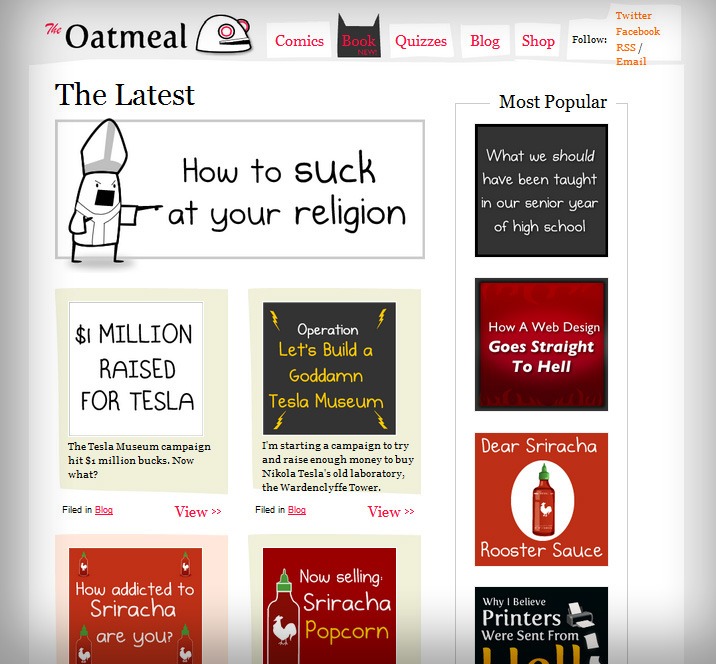
Not two months later, Inman is in the midst of a second fundraising campaign, this time to help build a Nikola Tesla Museum in New York. This one’s even bigger than the last:  28,000 people have already donated $1,157,294 for Tesla and there are still 32 days left in the campaign.
You can donate here.
I’m not suggesting for a moment that Inman took on these noble causes because he wanted to drive more traffic to his site. But both campaigns have only raised The Oatmeal’s profile and earned him more die-hard fans. It’s certainly nice as a blogger thatdoing good is so good for you.

Design

Simple, Tile-Based Design

Inman is a graphic designer and most posts on TheOatmeal.com are comics, so it makes sense that the site’s design skews toward the visual.
His tile-with-a-headline approach is very economical with space and it allows his home page to show 25 posts without looking anywhere close to cluttered.
This design choice plays a big role in how “sticky” TheOatmeal.com is (a website is “sticky” when a visitor spends a lot of time there visiting multiple articles). At the bottom of each post, after the comments there are eight of these tiles – each one inviting the visitor to click on its clever headline.

Slim Header

The Oatmeal’s header area is less than 70 pixels tall. A larger header can make a strong visual statement and grab people’s attention, but The Oatmeal’s short header leaves more room above the fold for people to see post images.

No Opt-In Box

Instead of the traditional email opt-in form with a field to input your email and a submit button (see Income Diary’s “Get Weekly Updates” box on the right of this page) The Oatmeal simply offers a pair of text “Email” links that take you to this page:
It wouldn’t surprise me if Inman could get more email subscribers with an ever-present opt-in box on each page, but doing it this way is less pushy and it ensures that everybody who is on his list truly wants to be there.

Monetization

The Oatmeal First Monetized with Donations

Once The Oatmeal to start receiving enormous amounts of traffic, the image-heavy site was costing him, “a couple grand a month in hosting fees.” Inman didn’t have a monetization plan yet in place, so he put up a simple Paypal donation button and the words, “Like The Oatmeal? It’s a one-man operation, so buy me a cup of coffee.”
Inman told The Chicagoist what happened next:
“I did the donation thing, and I thought I would get a couple of dollars a day, but I was getting a lot of traffic and it ended up being much more than that. I actually felt guilty, and I thought I should be giving them something in return, and that is when I decided to start selling merchandise—posters and stuff.”
Inman was in fact earning hundreds of dollars a day. It was more than enough to pay the hosting fees, but he was nowhere near his current figure of $500k per year. That income would come from his next monetization strategy.

Selling ‘Posters and Stuff’

Today, about 75% of The Oatmeal’s profit comes from merchandise:  informational wall posters, greeting cards, calendars, clothing, coffee cups, signed prints, stickers, magnets, badges. Inman is also the author of two books, which he’s supported with national book tours (5 Very Good Reasons To Punch A Dolphin In The Mouth (And Other Useful Guides) and the upcoming How to Tell if Your Cat is Plotting to Kill You.)
Danny Bradbury of The Guardian offers this informed analysis of The Oatmeal’s earnings from merchandise:
“The product prices range from $5 to $45; the average is about $20. To get $375,000, or 75% of the total, in merchandise revenues requires selling 18,750 products (375,000/20) each year. That’s 1,530 products per month, or 51 products every day. Given a reader base of about 7m, he only needs convert 0.02% of visitors to buy a product.”
Inman uses a ‘Shop’ tab at the top of his site to sell his products, but he’ll also occasionally include information about products in his posts. Inman revealed to The Washington Post his most successful products:
“The highest-selling item in my store are the posters. The educational ones, like the grammar posters, are funny but good to have up on your wall. [In fact] the entire public-school system in Sydney, Australia put hundreds of my posters in their classrooms.”

The Power of the Discount

We all know that a limited-time sale can increase conversion, which is why the occasional bargain is a big part of The Oatmeal’s monetization strategy. Abe Aboraya of Seattle Weekly tells the story of Inman’s first big sale:
“For The Oatmeal’s first anniversary, he had a half-off sale, expecting maybe two or three times the normal amount of orders. That one day, the store did $25,000 worth of business, 10 times the average. He had to call in his cousins to help process the orders, and it took weeks to catch up.”

Advertising

The other 25% of The Oatmeal’s income comes from advertising. That may not sound like much, but it amounts to about $175,000 per year.
Still, advertising isn’t in Inman’s long-term plans. He told The Washington Post:
“I’d love to drop advertising altogether. Especially when something is not a product that fits well with my site. … I’d rather sell books and sell posters than get clicks from a machine ad.”

The Final Takeaway

At the heart of The Oatmeal’s success is the unique, creative, and genuinely funny content that Inman creates week after week. He’s simply great at what he does – and it’s not because of luck, but because he had the courage to take a chance on that one thing he wanted more than anything.
But Inman succeeds in a way that other great comic writers don’t because he has forged a personal connection with his readers. He lets it all hang out, refusing to censor himself online even as he’s more and more in the spotlight. The result is a loyal following of people who trust Matt and actually feel like they know him personally.
In all likelihood, you’re not operating an entertainment website and you can’t afford to be as crass and comical as The Oatmeal. But we can all try to emulate the candor, integrity, and commitment to excellence evident in his work. That’s what sets him apart and makes him one of the world’s most entertaining – and successful – bloggers.

How to Write Epic Blog Posts that Rank Well

Image Courtesy of AlphaGeek

I started writing for Income Diary one year ago.
Through 34 posts, I’ve learned a lot about writing great online content – particularly content that ranks well with search engines. I’m proud to say that many of my articles show up on Google’s front page (for terms like “great thoughts” and “Steve Jobs life lessons”).
This type of content is the engine driving Income Diary’s success. I’m not privy to the exact statistics, but I know that Income Diary gets a huge monthly traffic stream from Google.
As more and more articles are published online every day, the competition to earn Google’s top spot gets ever-fiercer. If you want to rank well in 2012 and beyond, you’ll have to write truly extraordinary content.
I’m here to share with you what I know about doing just that. You too can write epic blog posts that rank on Google’s front page for popular keywords.

What You’ll Learn:

  • What a good post has in common with Walmart
  • The three types of epic posts I write
  • Why quotations are your best friend
  • Why I use two separate Word documents to write epic posts

What Makes a Blog Post Epic?

Image Courtesy of AlphaGeek

A “One-Stop” Destination

The Super Walmart in my town is the ultimate one-stop-shopping locale. You can buy clothes, groceries, bicycles, electronics, get your hair cut, have your eyes inspected, and get your car’s oil changed – all in one place.
People love Walmart because they can get almost anything without having to go all over town.
Google loves web pages for the same reason. They want to deliver search results that provide their customers with everything they need, without having to follow a bunch of links. So be thorough. Before you click ‘Publish’, ask yourself if there’s anything else that you could provide the audience of post.
Now personally, I don’t love Walmart. I would rather shop at a smaller, local store with a bit of character (by lawrence). But I do love thorough web content that save me time by giving me all of the information I could possibly need in one place.

Length

All of my posts on Income Diary are at least 2,000 words long.
It’s not because I think longer is better. Sometimes less is more. Seth Godin is one of the world’s most successful bloggers and he rarely writes posts longer than 300 words. Short posts are easy to read – and therefore easy to comment on and share.
But don’t count on your short posts ranking well with search engines.
You’ll have a better chance of getting on the front page of Google if your post is at least 2,000 words. Longer posts have more keywords, more often, and in more combinations. Search engines also see them as being more likely to fulfill their users’ needs because they contain more information.

Types of Epic Posts

There’s no strict format that your post needs to adhere to in order to be epic and rank well, but it does help to have a loose template so that things stay organized.

Lists

Last December, Josh Dunlop published a post called Top 20 Blog Posts of 2011. You can probably tell by the title that this post adopted a list format, but what may surprise you is that of the 20 top Income Diary posts in 2011, 15 of them were list posts!
Readers love top list posts because they’re easy to read and they rank the best of the best. Income Diary loves list posts because they’re its greatest source of traffic. I like writing list posts because the format is so simple.

Step-by-Step Guides

The remaining most successful Income Diary posts of 2011 were mostly step-by-step guides. Guides always make for great blog content because they provide enormous value to readers and they’re search-engine friendly.
You can format your guide by breaking the process down into its essential steps and then breaking those steps down further into sub-steps, if necessary.
The goal of a guide is to make the task easy to complete for your readers. So most good guides won’t be particularly lengthy. But when you need to guide your reader through an especially nuanced process, like making a successful Kickstarter campaign, a guide can become very epic indeed.

Category

Not every subject fits snuggly into a list or guide.
Take for example the “Blogger Profiles” I’ve been writing lately, like this one about Matthew Inman of The Oatmeal. The goal of these posts is to give an overview of what makes each top blogger successful – and that’s a pretty broad topic.
In order to make it digestible, I organize each post into four categories:  content, driving traffic, design, and monetization. Then I break down each category into three lessons. It’s not just better organized; it also allows readers to self-select which areas they want to learn about.

What to Include in an Epic Blog Post

courtesy of helgabj

Eye Candy

The web is so full of flashy graphics, high-res photos, and animated videos… it’s asking a lot of your audience to get through 2,000 words without a little bit of eye candy.
A few images go a long way to break up the text and attract the attention of people who may just be skimming through. Images can also help to clarify the composition of longer articles. You’ve probably already noticed that there’s a new image for each new category in this post.
The same goes for video. It only takes a couple of minutes to search YouTube and embed a video into your post.

Bullet Points

I’ve recently started adding some “What You’ll Learn” bullet points near the beginning of all of my Income Diary articles. This is the last thing that I write and it only takes me a minute, but it serves a couple of really important purposes.
First of all, it gives the reader a bit of a roadmap for the post; he or she can take in a few bullet points and immediately know if the content below contains what they’re looking for. This is especially important on these longer posts.
The bullet points also give the reader some benefits for reading on. Usually, a benefit is apparent in my headline or introduction, but it doesn’t hurt to toss in a few more reasons why you’ll be better off after getting to the bottom of the page.
Finally, bullet points can create a curiosity gap. If you make your bullet points truly fascinating, they’ll function like cliffhangers at the end of a chapter in a novel:  your readers will be compelled to read on just so they can satisfy their curiosity.

Quotations

As an online writer, quotations are your best friend. I’ve never written an article for Income Diary without at least one quotation and most of my posts have at least five.
So why am I so in love with using quotations? I’ll give you three good reasons.

#1 Block Quotes Create Space

A block quote is a quotation that’s set apart from the main text. Like this:
“I always have a quotation for everything – it saves original thinking.”
Dorothy L. Sayers
Since it’s indented, italicized, and on a gray background, the block quote really stands out visually. It’s a welcome break from paragraphs of text.
But block quotes create more than just visual space. Since they pull the reader away from the main text, they also create temporal space. A reader is more likely to take an extra moment to reflect after reading a block quote. In this way, they serve as powerful points of emphasis or transition within your writing.
Not all quotes have to be block quotes, however.  Sometimes the best way to use a quotation is to incorporate it directly into your paragraph text.

#2 Quotations are Authoritative

“A quotation in a speech, article or book is like a rifle in the hands of an infantryman. It speaks with authority.”
Brendan Francis
Good writing establishes authority and quotations offer one way to make your writing more authoritative by “borrowing” the authority of the original speaker. If you implement a quote from a well-respected expert, your reader will trust that it’s true because they trust the source.
Some of this trust bleeds through to rest of your article. Your reader will recognize that you’ve done some research and that your views align with those of experts.

#3 Quotations are Powerful

“An apt quotation is like a lamp which flings its light over the whole sentence.”
Letitia Elizabeth Landon
Letitia Elizabeth Landon is an English writer who died in 1838. Why am I repeating her quote here over 170 years later?
It’s because she’s already said what I want to say better than I can. Her statement above “flings its light” on what makes quotations so powerful.
A good quote injects your writing with energy because it’s evocative, impactful, and gets right to the heart of its subject. If you’re thinking about using that doesn’t have these qualities, then you probably just shouldn’t use it.

How to Find Relevant Quotations

Google:
There’s a plethora of quote databases online that archive quotes based both on category and author. BrainyQuote (Alexa Rank: 1,486) is a good place to start.
To find the two quotes above, I literally just Googled “quotes about quotations” and ended up on BrainyQuote.
Books:
If you’re an avid reader of books in the same niche as your blog, then you should consider keeping a reader’s journal. Whenever you’re reading, have it with you so that if you stumble upon a winning sentence you can transcribe it, along with the author name and page number.
Consult your reader’s journal before writing a blog post and see if any of those powerful expressions are relevant to your article.

How to Format a Block Quote for your Blog

When you’re formatting your post in the visual editor, just highlight your quote and press “ALT + SHIFT + Q”. You can also just click the icon that looks like a quotation mark.
If you’re formatting in html, the tag is “<blockquote>”.

Putting it All Together

courtesy of pratap sankar

Drafting

When I start writing a long article like this one, I’ve got about a thousand different ideas running through my head… possible angles, sections, and sentences. I need a place to start hashing all these ideas out and refining them.
So I start a “draft” Word document where I can brainstorm, pre-write, and otherwise scrawl down every thought that comes into my head.
Eventually, these ideas start coming to form. When that happens, I start a new “final” document and begin copy-and-pasting the polished writing into it from the draft.
From then on, I keep both of these documents open. The “draft” document gives my scattered, creative mind a place to roam free. The “final” document gives me a structured place to reign in the chaos and set my writing in stone.

Formatting

The longer your post is the more important formatting becomes. Images and block quotes will go a long way towards making your content more digestible, but there’s no substitute for headings and sub-headings.

Writing

If you expect someone to sit down and read 2,000+ words, you owe it to them to write those 2,000 words very well. That means giving yourself plenty of time writing about something that you actually know a lot about.
If you want some writing advice, you can check out my article of tips on how to become a better online writer.

Ready to Get on Google’s Front Page?

Writing valuable, thorough, and otherwise epic content is the single most important thing you can do to rank well with search engines. But you won’t get to the top for competitive keywords unless you take additional optimization techniques into account.
To learn more about how to optimize for search, I recommend you check out these two Income Diary articles from Nicholas Tart:
9 Reasons Why You’re Not Getting Search Engine Traffic